

Most business owners never set out to care about WordPress editors. Yet comparing gutenberg vs elementor becomes urgent two years after launch when simple edits stall your phone. Suddenly, a routine plugin update shifts pricing columns sideways, or cellular pages lag despite having only ten pages.
When our engineers at BMA Business Solutions GmbH in Chur audit inherited sites, page-builder bloat tops the list of speed bottlenecks. However, internet dogma exaggerates both sides. Below, we compare native blocks against Elementor on DOM weight, annual licence debt, safe staff editing, and fixed-cost migration. For instance, our small business website design packages start at $199 (£149 | CHF 164) with full code ownership.
Side-by-Side Comparison: Gutenberg vs Elementor (2026)
Before looking at code metrics, compare both WordPress workflows across speed, ownership, and team editing safety.
Engineering, Cost & Portability Matrix
| Dimension | Native Gutenberg (+ Clean Theme) | Elementor (Free / Pro + Add-Ons) |
|---|---|---|
| Rendering Layer | Built into WordPress core; shallow semantic HTML | Plugin wrapper layer adding nested div containers and CSS/JS |
| Mobile Speed & INP | Fast baseline speed; minimal main-thread work | Needs container conversion and asset unloading to match |
| Licence Cost | $0/yr core editor forever; zero Pro key lock-in | Annual Pro renewal needed for forms, headers, and popups |
| Content Portability | Clean standard markup survives theme switches | Deactivating plugin strips grids and exposes fallback layout |
| Team Editing Safety | Global theme tokens lock fonts and mobile spacing | Per-widget margin boxes risk accidental mobile breaks |
Notice how editor choice shapes long-term total cost of ownership. Therefore, read our benchmark on WordPress vs Wix vs Squarespace if you are also weighing WordPress against closed SaaS builders.
1. DOM Weight, LCP & Mobile Interaction Speed (INP)
To see why native blocks feel snappier on real smartphones, picture what a phone unpacks before displaying your Call button. Google evaluates both paint speed and input delay through Core Web Vitals.
Why Deep DOM Trees Stall Mid-Range Phones
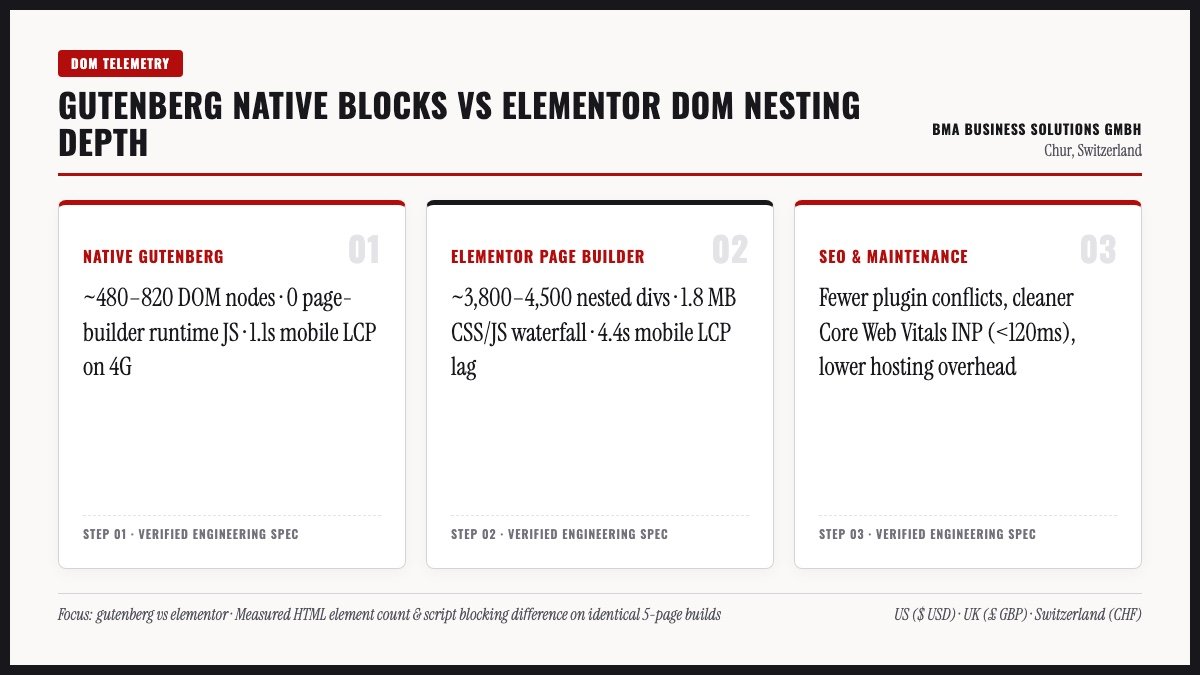
Every web page sends an HTML tree of nested boxes called the Document Object Model (DOM). On office fibre, a desktop browser chews through 2,200 nodes easily. However, a three-year-old phone on commuter 4G stalls while parsing deep wrappers and initializing JavaScript UI widgets. Because concentric section and column wrappers multiply element counts, browser CPU threads stay busy longer. You can read Google’s engineering guidance on DOM size and interactivity.
How Native Blocks Keep Payload Lean
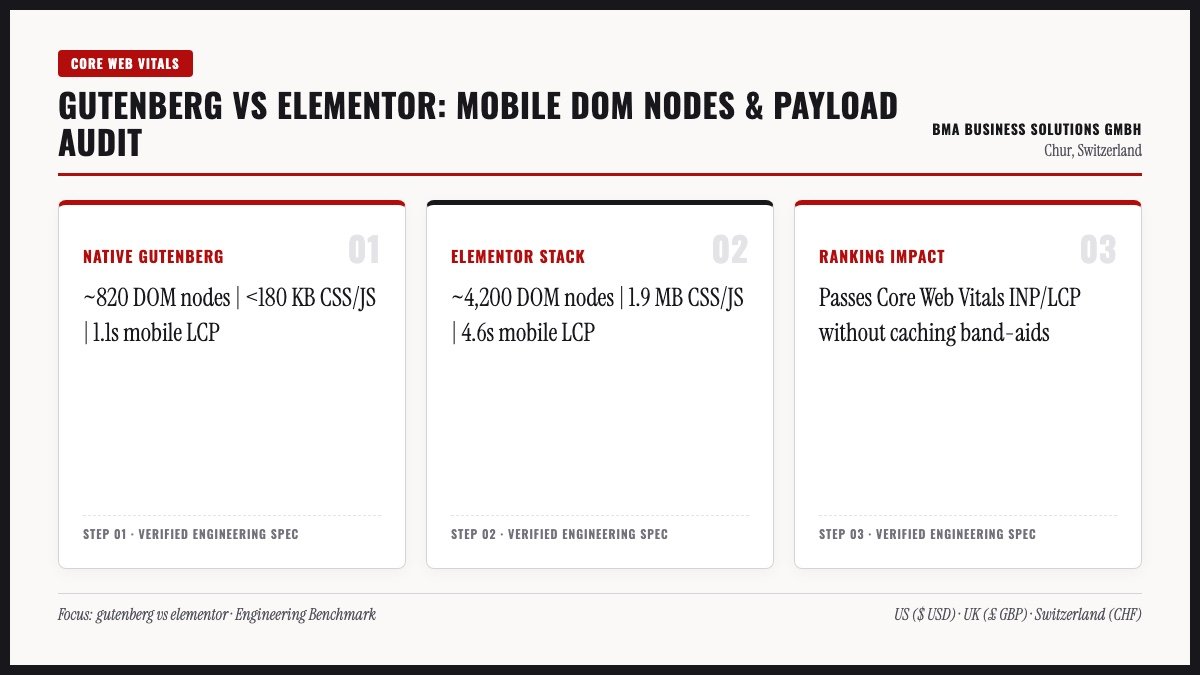
Native Gutenberg stores typography scales, colour tokens, and grid spacing globally inside your theme. As a result, a hero banner needs shallow markup, keeping Largest Contentful Paint and Interaction to Next Paint crisp. We run this lean stack on zurichfashionblog.com, top-dividend-stocks.com, and swiss-heritage.com.
Test your own site in twenty seconds using Chrome DevTools or PageSpeed Insights. Clean native pages sit around 350 to 750 DOM nodes, while bloated builder templates often top 2,000 nodes. Explore more tuning tactics in our website speed optimisation guide.
2. Recurring Licence Debt & The Plugin Multiplier
Even owners who never inspect DOM counts hit the second drawback of visual builders: recurring licence traps. Because free Elementor omits headers, forms, and grids, agencies install Pro plus third-party widget suites.
Expired Agency Keys & Update Breakage Chains
- Lapsed Agency Bulk Licences: Many budget shops install shared multi-site Pro keys that stop updating after handoff.
- Third-Party Add-On Lag: When WordPress core updates, older widget packs occasionally break mobile layouts for weeks.
- Overlapping Interface Widgets: Legacy audits often reveal Elementor Free, Pro, carousel packs, and separate header builders running together.
Consolidating those overlapping widgets back into native block markup trims total plugins from twenty down to roughly six essentials. With a custom native WordPress website, the editor ships inside WordPress core for $0 per year forever. So nothing expires if you switch hosts or hire a new developer.
Safe Day-to-Day Editing Without Layout Drift
Native blocks also protect your layout from accidental staff edits. Because Elementor exposes per-widget padding and hide toggles, one wrong drag on desktop can break phone margins. By contrast, native Gutenberg locks global spacing tokens so staff update headlines and photos safely. In short, team editing stays fast without CSS drift.
Database Autoload Bloat in Page-Builder Stacks
Every extra widget pack adds rows inside your WordPress options and postmeta tables. Over two years, those orphaned stylesheets and license checks slow down every admin screen and PHP request. By contrast, a lean gutenberg vs elementor benchmark shows core blocks store clean HTML directly in post content. As a result, database backups shrink and routine PHP upgrades finish without fatal errors.
In fact, leaner databases lower hosting resource spikes during traffic bursts. Your small business site stays responsive on standard commodity hosting instead of needing costly server upgrades.
Ditch Builder Licence Debt for Clean Native WordPress
Migrate off slow Elementor templates or launch fresh from $199 (£149 | CHF 164) in 7 working days—backed by our 100% On-Time Money-Back Guarantee.
3. Triage Matrix: Gutenberg vs Elementor Migration
Pause before clicking Deactivate on Elementor inside a live dashboard. Deactivating it immediately strips grid styles and leaves raw fallback content behind. Instead, choose the right path in the gutenberg vs elementor triage matrix below.
Practical Decision Paths for Existing Sites
| Current Site Health | Recommended Path | Practical Rationale |
|---|---|---|
| Fast on phones, green Core Web Vitals, owned Pro key | Keep Elementor until next redesign | Never spend capital fixing a fast site that already converts cleanly. |
| Slightly slow with 3+ add-on packs and old sections | Targeted cleanup sprint | Convert sections to Flexbox containers and remove unused add-ons. |
| Slow mobile LCP/INP, broken updates, or expired agency key | Clean native Gutenberg rebuild | Modular rebuild ($199 base + $50/page) erases builder debt permanently. |
Four-Step Zero-Downtime Rebuild Process
When a rebuild makes sense, follow a staged cutover inside our website redesign workflow so rankings stay intact:
- Inventory Live URLs & Metadata: Export every permalink, H1/H2, and Yoast title before touching layouts.
- Rebuild on Isolated Staging: Recreate clean native blocks matching your brand without altering winning URL slugs.
- Verify Forms & Core Web Vitals: Test SMTP delivery, schema, and 390px phone views before DNS switch.
- Purge Builder Bloat & Submit Sitemap: Clean orphaned postmeta tables and watch Search Console for 14 days.
4. Modular Pricing, Custom Visuals & Practical Exceptions
Sceptics sometimes claim native Gutenberg cannot match custom agency visuals. Anyone saying that has not inspected modern WordPress Grid containers, synced patterns, and fluid typography.
Modern Visual Polish Across Live Portfolio Builds
Look at our live client builds at BMA Business Solutions GmbH: trilingual actuarial hub allea.ch, incorporation portal open-business.ch, coaching brand amfcoaching.ch, and booking platform localcatsitter.ch. We also built bilingual noonwoodwork.com and corporate site metzugag.ch. Even bespoke views like the 3D globe on easyglobalbanking.com load solely on target routes.
Modular Rebuild Pricing & Tri-Market Compliance
Best of all, rebuilding onto native blocks follows transparent modular pricing. Our Base Single-Page site costs $199 | £149 | CHF 164 (live in 7 working days). Next, Extra Pages cost +$50 | £37 | CHF 41 per page (2–7 page sites live in 14 working days). Foreign Language setups add +$100 | £75 | CHF 82 plus $30 | £22 | CHF 25 per translated page, while WooCommerce adds +$500 | £375 | CHF 412.
Every build includes our 100% On-Time Money-Back Guarantee and full ownership. Across the US, we build to ADA and WCAG 2.2 accessibility standards. Meanwhile, UK sites align with UK GDPR, ICO cookies, and Companies Act 2006 footers, and Swiss builds meet nFADP and UWG Art. 3 Impressum rules.
When Keeping Elementor Still Makes Practical Sense
Balanced advice builds trust because no single tool fits every team. Keep Elementor if your in-house marketers launch four asymmetric ad funnels weekly without developer help. Also keep it if custom Loop Grids power complex directories that already pass Core Web Vitals. Otherwise, native Gutenberg cuts website maintenance cost and lasts longer.
30-Day Post-Migration SEO & Speed Verification
After completing a gutenberg vs elementor migration, run four quick checks across the first month. First, inspect Google Search Console Coverage to confirm every commercial page returns HTTP 200 status. Second, run key landing URLs through PageSpeed Insights on mobile 4G throttling. Third, submit live test enquiries on smartphones to verify SMTP delivery and redirect rules.
Fourth, review active plugins inside your dashboard and delete any deactivated legacy builder helpers. Keeping only essential SEO, backup, caching, and form plugins prevents future update conflicts. In short, disciplined post-launch checks protect rankings while locking in faster gutenberg vs elementor performance gains.
Five-Minute Editor Audit for Any WordPress Site
Still unsure how your current pages render? Inspect one service URL today using your browser tools and compare plugin count against core needs. Also check whether mobile menus or contact forms stall when scrolling on 4G cellular networks. Usually, removing heavy page-builder wrappers delivers the single biggest speed jump available under $200. Clearly, choosing clean gutenberg vs elementor architecture pays off across every future marketing campaign.
Measuring Real Asset Payload Before & After Cleanup
Look at three concrete numbers in Chrome DevTools Network tab to quantify builder overhead objectively. First, count total CSS and JavaScript requests loaded on a standard service page before scrolling. Elementor sites with two add-on packs routinely fire 35 to 55 separate asset files on initial load. By contrast, clean native Gutenberg pages typically ship under 14 lean stylesheets and scripts.
Second, measure total uncompressed HTML document weight alongside rendered DOM node count. Third, check mobile Interaction to Next Paint scores inside PageSpeed Insights field data. When mobile scores climb from 58 into the 90s, bounce rates drop across both organic clicks and paid search ads.
Training Office Staff to Edit Native Blocks Safely
Business owners often worry that leaving visual builders makes day-to-day updates harder for office staff. In practice, the opposite happens once global styles lock fonts, spacing, and brand colours. Staff simply click any headline, paragraph, or price cell directly inside the WordPress editor and type. Because reusable block patterns keep column grids aligned automatically, nobody breaks mobile layouts during routine updates.
That editorial simplicity saves hours every quarter while cutting external support tickets down to near zero.
Five-Year Portability & Hosting Freedom
Think five years ahead before choosing an editor for your business domain. Sites built with clean core blocks move seamlessly between cloud hosts without broken layout shortcodes. In addition, any competent WordPress engineer worldwide can extend your site without learning proprietary widget hacks. Meanwhile, your pages avoid sudden theme-framework retirements that force unexpected emergency rebuilds. So evaluating gutenberg vs elementor on long-term portability protects your company against future agency lock-in.
Frequently Asked Questions: Gutenberg vs Elementor
Specifically, these answers cover the cost, speed, and ownership questions small business owners ask us most often. Click any question below to expand the direct engineering details.
Related Engineering & Cost Guides
Meanwhile, continue planning your build with three deeper breakdowns from this exact series:
How to Build Trust With Your Website Design
Apply transparent pricing, legal Impressum proof, and clear above-the-fold messaging to boost leads.
High-Converting Small Business Landing Page Design
Structure your hero promise, proof table, and inquiry form for maximum paid and organic ROI.
Independent Small Business Web Hosting Guide
Choose fast NVMe hosting in your business name to keep TTFB under 200ms with zero vendor lock-in.
Tired of Sluggish Page Builders or Expiring Agency Licences?
Upgrade to lean native WordPress blocks or migrate off Elementor without breaking a single search URL—starting at $199 (£149 | CHF 164) with our 100% On-Time Money-Back Guarantee.