
Effective website speed optimisation on a small business site comes down to three clear user targets. Your main hero content appears within 2.5 seconds, taps respond within 200 milliseconds, and layouts never jump mid-load. In fact, most slow business websites fail those thresholds because of the same three mistakes. They upload oversized hero photos, suffer slow server responses, and load excessive third-party tracking scripts.
Meanwhile, generic enterprise speed guides waste your afternoon on edge computing and complex build pipelines. A local service firm with six pages needs a practical order of repairs instead. At BMA Business Solutions GmbH, our affordable website design packages hit fast load targets natively from day one. This guide gives you the exact seven-step fix sequence, plus how to spot when a site needs a rebuild.
What Fast Website Speed Means in Real Numbers
Google measures real visitor experience through three Core Web Vitals metrics on web.dev. Largest Contentful Paint (LCP) tracks how fast the main headline or hero image finishes rendering. Interaction to Next Paint (INP) measures the delay between a mobile tap and the browser’s visual response. Finally, Cumulative Layout Shift (CLS) counts unexpected jumps while banners, images, and fonts load.
Core Web Vitals Pass Thresholds
Because Google scores each metric at the 75th percentile of mobile visits, three out of four visitors must pass. Use the official thresholds below whenever you audit website speed optimisation results.
| Vital Metric | What Your Visitor Feels | Good Target | Needs Work | Poor Score |
|---|---|---|---|---|
| LCP | Main hero content appears cleanly | 2.5 s or less | 2.5 s to 4.0 s | Over 4.0 s |
| INP | Button or menu reacts to tap | 200 ms or less | 200 ms to 500 ms | Over 500 ms |
| CLS | Text stays locked without shifting | 0.1 or less | 0.1 to 0.25 | Over 0.25 |
Does Website Speed Affect Rankings and Conversions?
According to Google’s page experience documentation, speed acts as a subtle tiebreaker rather than a silver bullet. However, real conversion data proves buyers abandon sluggish mobile pages long before rankings even shift. For instance, Vodafone’s controlled web.dev case study recorded an 8% sales lift after improving LCP by 31%. So speed improvements directly protect your paid ad spend and organic enquiry rates.
Measure Field vs. Lab Data Before Touching Plugins
Mixing up lab tests and field data wastes hours of developer time every week. Lab data comes from one simulated visit inside PageSpeed Insights on throttled hardware. By contrast, field data comes from actual Chrome users over the preceding 28 days. Because low-traffic sites sometimes lack enough CrUX samples, check both your domain report and key landing pages.
Next, learn where a slow page actually loses its time before installing random caching plugins. According to web.dev’s LCP breakdown guide, a healthy page spends 40% on server response and 40% downloading the hero image. Meanwhile, resource load delay and render delay should stay under 10% each. Testing three consecutive PageSpeed runs and taking the median stops normal server noise from misleading you.
Splitting Your LCP Budget Across Four Stages
First, inspect the four sub-parts of Largest Contentful Paint inside PageSpeed Diagnostics. If server Time to First Byte exceeds 800 milliseconds, compressing images alone cannot fix your LCP score. Instead, solve the biggest stage first so every hour of website speed optimisation pays off. Meanwhile, our custom WordPress website design breaks down the three-year numbers step by step.
Seven Website Speed Optimisation Fixes in Priority Order
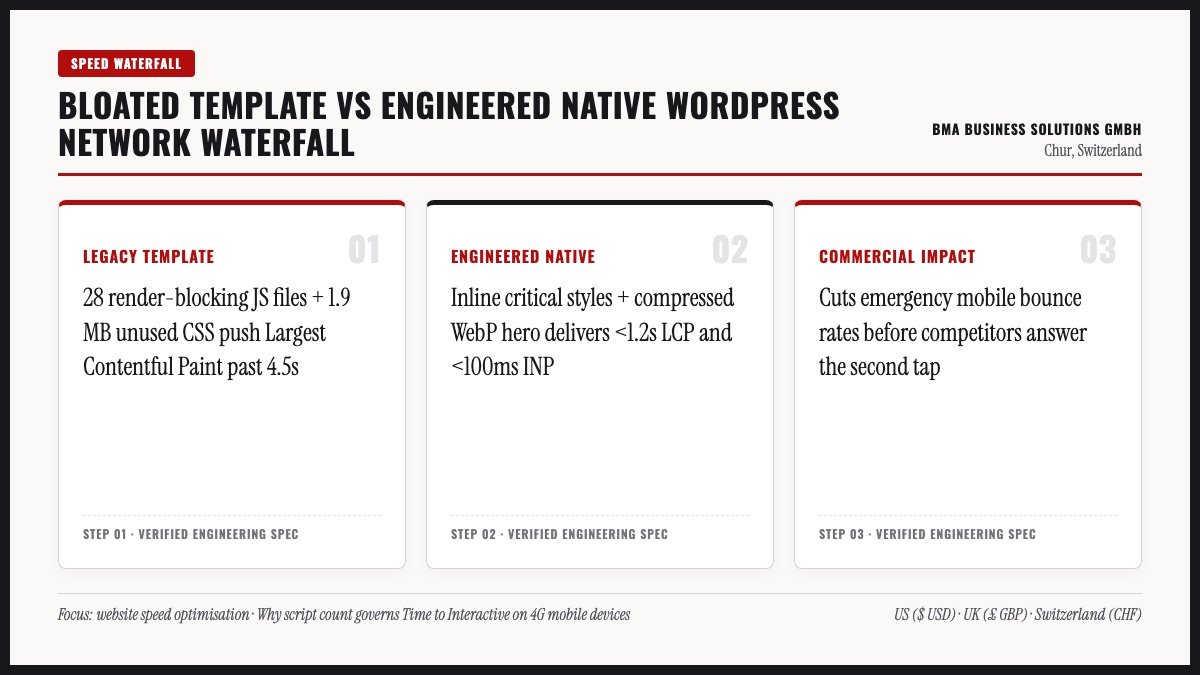
Work through these seven fixes strictly in order rather than enabling aggressive CSS minification on day one. The first three steps solve roughly 80% of real-world small business slowdowns with minimal risk of breaking layouts. At BMA Business Solutions GmbH, sites like zurich-fashion-blog.ch and seo-partner.ch use this exact sequence.
Step 1: Fix Your Hero Image Size and Loading Priority
The HTTP Archive Web Almanac shows an image is the LCP element on 76% of mobile pages. Alarmingly, 17% of mobile pages accidentally apply loading=’lazy’ to that top hero image, delaying the browser immediately. First, remove lazy-loading from your top hero photo and add fetchpriority=’high’. Second, resize 4,000-pixel camera uploads to 1,600 pixels wide and convert them into WebP.
Notice that shrinking a single 3.2 MB hero photograph down to a 180 KB WebP file saves 2.45 seconds instantly. That single change requires zero coding skills and zero paid speed plugins.
Steps 2 to 4: Server Caching, Third-Party Scripts, and Tap Delay
- Speed up server TTFB: Enable page caching via host tools or LiteSpeed Cache so WordPress serves static HTML under 0.8 seconds; compare hosts in our small business hosting guide.
- Eliminate redirect chains: Point internal links directly to canonical URLs to prevent extra TLS round trips.
- Trim third-party scripts: Audit live chats, heatmaps, booking widgets, and social feeds, then load interactive maps only on click.
- Protect tap responsiveness (INP): Replace sluggish sliders and bloated page builders with lightweight native Gutenberg blocks.
Steps 5 to 7: Layout Stability, Local Fonts, and Careful Minification
- Stop layout jumps (CLS): Set explicit HTML width and height on every image and keep cookie consent bars as fixed overlays.
- Host clean WOFF2 fonts: Limit fonts to two families, host files locally on your domain, and apply font-display: swap.
- Test CSS and JS pruning last: Toggle unused-CSS removal one feature at a time and test contact forms after every change.
Speed Myths to Skip and When to Rebuild
Developers often pitch expensive infrastructure upgrades that deliver almost zero benefit for a local brochure website. For example, rewriting a six-page WordPress theme in Tailwind or deploying custom edge workers rarely improves real buyer speed. Likewise, WordPress 6.8 already includes conservative speculative loading by default without custom JavaScript hacks. Check our Gutenberg vs Elementor benchmark to see how base architecture shapes performance.
Popular Speed Tactics You Can Safely Ignore
Skip these over-engineered recommendations until you master basic image sizing, server caching, and script hygiene. Focus your budget where real mobile visitors actually feel the difference.
| Common Speed Pitch | Our Honest Engineering Verdict |
|---|---|
| Custom edge workers for brochure pages | A solid page cache gives 95% of the gain at zero complexity |
| Rebuilding simple CSS into Tailwind | Your WordPress theme DOM depth matters far more than CSS syntax |
| Chasing a 100/100 Lighthouse score | Pass mobile Core Web Vitals thresholds instead of gaming lab scores |
| Installing animated pre-loader screens | Pre-loaders hide slow assets instead of removing the real delay |
Repair Existing WordPress vs. Full Clean Rebuild
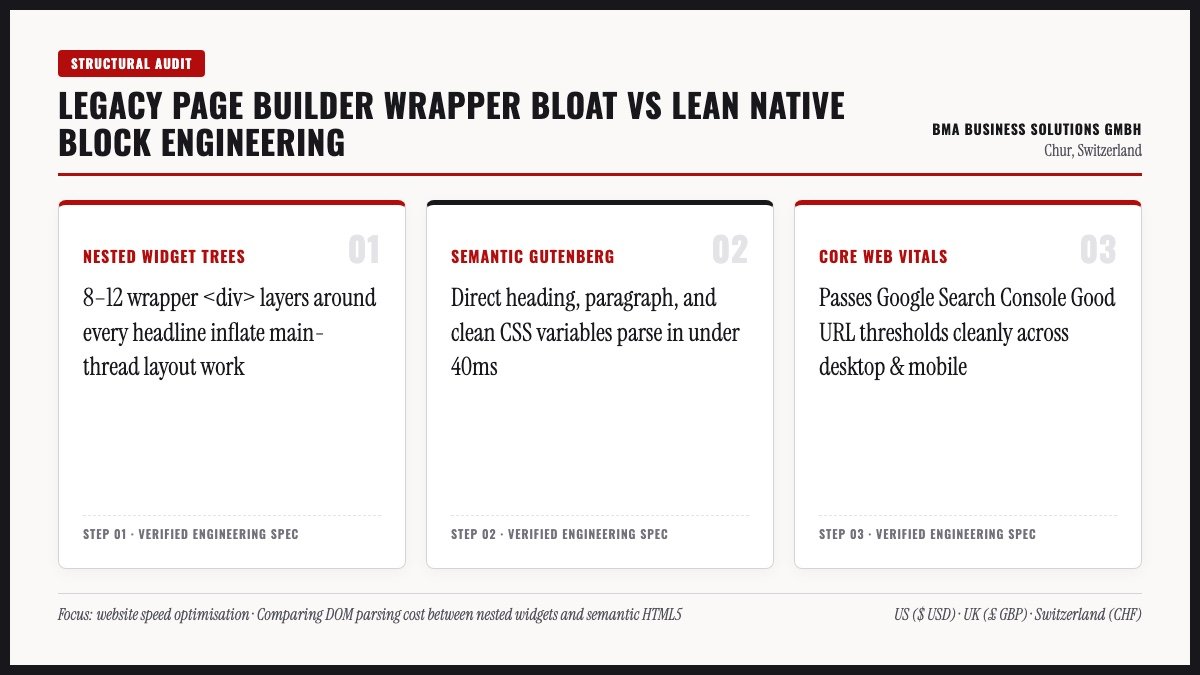
Most slow sites recover within a few hours of careful image, cache, and script tuning. However, deep structural bloat inside heavy multipurpose themes costs more to patch each year than replacing cleanly. Use this diagnostic table alongside our website redesign guide and technical WordPress SEO checklist.
| Observed Speed Bottleneck | Usually a Repair | Usually a Rebuild |
|---|---|---|
| Uncompressed hero images and missing WebP | Yes | No |
| No page cache or sluggish shared hosting | Yes | No |
| Unused tracking pixels and chat widgets | Yes | No |
| Deeply nested page-builder DOM wrappers | No | Yes |
| Closed SaaS builder locking script control | No | Yes |
Replace Sluggish Templates With Native Speed From $199
If patching your legacy theme feels like fighting quicksand, switch to clean native WordPress engineering. Every build ships in 7 to 14 working days with our 100% On-Time Money-Back Guarantee.
Monthly Maintenance and Tri-Market Compliance
Websites naturally slow down whenever staff upload 5 MB photos or install new marketing widgets. Therefore, schedule a ten-minute monthly check in PageSpeed Insights and Search Console’s Core Web Vitals report. Audit newly uploaded media file sizes and prune unused plugins quarterly using our website maintenance services workflow. Consistent small checks preserve your website speed optimisation gains all year.
Keeping Cookie Banners and Accessibility Fast Across Regions
Heavy third-party consent scripts often become the largest LCP bottleneck across international sites. First, UK sites should run lightweight consent overlays following ICO cookie guidance so banners never push page layouts down. Second, US websites using clean semantic HTML meet ADA and WCAG 2.2 accessibility standards while running faster on mobile browsers. Finally, Swiss firms should pair compact nFADP notices and UWG Art. 3 Impressum footers (fedlex.admin.ch) with lightweight DE/FR/IT/EN switching.
WordPress 6.8 Speculative Loading and Caching Exclusions
Modern WordPress already gives small sites native speed advantages without paying for bloated add-ons. For example, WordPress 6.8 speculative loading prefetches likely next pages conservatively once a visitor hovers or taps. Still, always exclude dynamic cart, checkout, and multi-step contact forms from full-page caching rules. Otherwise, visitors see stale form tokens or broken WooCommerce basket counts during checkout.
Ten-Minute Monthly Website Speed Optimisation Routine
Even fast WordPress builds drift slower over time as staff upload raw phone photos or embed tracking pixels. First, test your homepage and top two service pages in PageSpeed Insights once per month and log median LCP. Second, inspect Google Search Console’s Core Web Vitals tab for any sudden ‘Needs Improvement’ URL clusters. Third, audit your media library’s newest uploads so no uncompressed 4 MB hero files sneak into live posts.
Because speed maintenance stays simple when your base theme is clean, regular checks take just ten minutes monthly. That small discipline protects every ranking and conversion gain from your website speed optimisation sprint.
Measuring Real Mobile Speed Gains After Deployment
After shipping speed fixes, verify improvements using both synthetic lab tools and real Search Console telemetry. First, run three PageSpeed mobile checks across your homepage, top service page, and contact page. Second, watch Search Console’s Core Web Vitals panel over the following 28 days as Chrome collects real buyer visits. Remember, passing mobile thresholds on real 4G handsets matters far more than hitting 100 on fast office fibre.
In addition, compare bounce rates and enquiry form completions before and after your website speed optimisation sprint. Faster pages consistently raise conversion efficiency across both organic search and paid campaigns.
Modular Website Speed Optimisation and Build Pricing
If a clean rebuild makes more sense than patching legacy bloat, our pricing stays 100% modular and transparent. Our Base Single-Page Website costs $199 | £149 | CHF 164 (up to 4 sections, 4 nav items, live in 7 working days). Extra pages cost +$50 | £37 | CHF 41 per page (no minimum, with 2–7 page sites live in 14 working days). Foreign language modules cost +$100 | £75 | CHF 82 setup plus $30 | £22 | CHF 25 per translated page with hreflang.
In addition, WooCommerce e-commerce adds +$500 | £375 | CHF 412 one-time with 0% commission and 10 products included (+$15 | £11 | CHF 12 each). Every website build carries our 100% On-Time Money-Back Guarantee plus 100% code and hosting ownership—never agency lock-in. Meanwhile, ongoing SEO retainers scope transparently case by case once your speed foundation passes Core Web Vitals. Pair fast builds with our small business SEO checklist and internal linking strategy to turn fast visits into leads.
Sources and Engineering References
Every benchmark in this website speed optimisation guide comes from official Chrome, web.dev, and WordPress engineering documentation. Review these primary references before choosing a caching plugin or theme rebuild.
- First, check web.dev Core Web Vitals thresholds and LCP optimisation breakdowns.
- Second, compare field vs. simulated metrics in Chrome User Experience Report (CrUX) methodology.
- Third, read mobile WordPress telemetry in the HTTP Archive 2025 Web Almanac performance chapter.
- Finally, verify ranking guidance inside Google Search Central: Page experience.
Website Speed Optimisation FAQ
Specifically, these answers cover the cost, speed, and ownership questions small business owners ask us most often. Click any question below to expand the direct engineering details.
Related Engineering & Cost Guides
Meanwhile, continue planning your build with three deeper breakdowns from this exact series:
How to Build Trust With Your Website Design
Apply transparent pricing, legal Impressum proof, and clear above-the-fold messaging to boost leads.
High-Converting Small Business Landing Page Design
Structure your hero promise, proof table, and inquiry form for maximum paid and organic ROI.
Custom WordPress Block Website Design
See why native Gutenberg blocks outrank heavy page builders in Core Web Vitals and long-term cost.
Ready for a Faster Website Without Agency Retainer Bloat?
Send us your URL for a straightforward engineering verdict on what to fix first—or lock in a clean native rebuild from $199 | £149 | CHF 164.