
To migrate Wix to WordPress without losing organic rankings, engineers must inventory every indexed Wix URL first, rebuild templates in lightweight native WordPress blocks on a staging server, and enforce exact server-level 301 redirect parity at DNS cutover. Executed with strict URL mapping, the move preserves existing backlink authority while cutting mobile load times cleanly.
Small business owners across the US, England, and Switzerland routinely stay trapped on Wix long after renewal bills climb past $450–$600 a year because they fear wiping out years of Google rankings. The real danger is not leaving Wix—it is launching a new WordPress site with changed slugs, missing redirects, and bloated page-builder themes. Our website builder vs web designer audit breaks down why engineered WordPress ownership beats SaaS lock-in over 36 months.
1. What Actually Exports From Wix (And What Needs Engineering)
Wix hosts pages inside a proprietary closed cloud engine rather than standard portable templates. There is no magical “Export to WordPress ZIP” button inside your Wix dashboard. If a migration tool promises instant one-click layout cloning, it typically scrapes external image URLs still pointing to Wix CDN servers or injects fragile inline positioning CSS.
Asset Portability: Automated Export vs. Manual Rebuild
Data assets—written articles, high-resolution product images, CSV customer lists, and metadata spreadsheets—move reliably when extracted methodically. Layout code, forms, booking rules, and navigation headers should be engineered fresh in native WordPress blocks so you leave behind megabytes of Wix runtime overhead.
| Website Component | Automated Export Capability | Required Engineering Step | Post-Migration Performance Effect |
|---|---|---|---|
| Blog posts (XML/RSS) | Partial text + embedded CDN URLs | Download & re-host every image locally in /wp-content/uploads/ | Eliminates broken third-party CDN links after cancelling Wix |
| Page layouts & headers | Zero portable HTML/CSS | Rebuild in clean native Gutenberg blocks (Kadence) | Cuts DOM node count by 50–70% on smartphones |
| SEO titles & meta descriptions | Manual copy or CSV crawl extraction | Import into Yoast SEO / Rank Math on staging site | Zero snippet drops in Google search results |
| Forms & lead routing | No direct plugin export | Configure authenticated SMTP + spam protection on WordPress | Fixes silent lead drops and improves deliverability |
| URL slugs & /post/ paths | Not preserved automatically | Write 1:1 server-level 301 redirect rules (.htaccess / Nginx) | Transfers 100% of link equity per Google site-move rules |
Re-Hosting Wix Media & Eliminating static.wixstatic.com
One of the sneakiest migration bugs occurs when CSV or RSS importers leave image tags pointing at static.wixstatic.com CDN URLs. The site appears normal on launch day, then loses every product photo and blog diagram weeks after you cancel your Wix subscription or Wix purges orphan assets. Always download original media files, convert hero graphics into compressed WebP/JPEG assets with explicit width and height attributes, and serve them natively from your WordPress uploads directory.
2. The Six-Stage Zero-Loss Migrate Wix to WordPress Protocol
Google’s Search Central site-move guidelines emphasize two non-negotiable rules during any platform switch: maintain complete URL-to-URL mapping and verify both properties in Search Console. Skipping either step forces Googlebot to discover changed addresses through 404 errors, which triggers temporary or prolonged ranking drops.
Stage 1: Crawl Inventory & Traffic Weighting
Before touching WordPress, crawl the live Wix domain with Screaming Frog or export every indexed URL from Google Search Console and your XML sitemap. Record each URL’s organic clicks, top queries, external backlinks, H1 text, and canonical tag into a master parity spreadsheet. Pages generating zero clicks and zero links can be consolidated cleanly into stronger parent hubs using 301 redirects.
Stage 2: Staging Build in Native Gutenberg Blocks
Provision your new hosting environment on a temporary staging subdomain marked noindex so search engines never index a half-finished clone. Build layouts using native Gutenberg blocks rather than heavy page builders like Elementor—see our Gutenberg vs Elementor benchmark for exact DOM depth comparisons. Re-upload every compressed WebP/JPEG asset directly to WordPress and match heading hierarchy (H1 through H3) intentionally.

3. 301 Redirect Architecture: Eliminating Rigid Wix Prefixes
Wix forces structural prefixes onto specific content types—most notably /post/ on blog articles, /product-page/ on store items, and hash-bang fragments on older templates. When you migrate Wix to WordPress, you gain clean permalinks like /blog-slug/ or /service-name/, provided a 301 permanent redirect bridges every old path to its exact new home.
Never point all retired Wix URLs lazily at the new WordPress homepage. Google treats mass homepage redirects as soft 404s, discarding the topical relevance and backlinks attached to those deep pages. Every single service, product, and blog article deserves a direct 1:1 match.
| Legacy Wix URL Pattern | Target WordPress Permalink | Redirect Rule Type | SEO Equity Outcome |
|---|---|---|---|
| /services-1 or /copy-of-plumbing | /emergency-plumbing/ | Exact 301 permanent rule | Cleans spammy auto-slugs while keeping 100% authority |
| /post/how-to-pick-accountant | /how-to-pick-accountant/ | Prefix strip 301 regex | Eliminates forced /post/ folder without losing backlinks |
| /product-page/oak-desk | /shop/oak-desk/ | Exact 301 + WooCommerce slug | Preserves product rich snippets and shopping links |
| /old-thin-announcement | /services/ | Consolidated 301 to parent hub | Merges weak crawl bloat into primary commercial page |
Handling Multilingual Wix Subfolders & Query Parameters
Businesses running bilingual Wix sites—common across Switzerland and US border metros—often use ?lang=de query parameters or /fr/ folder paths that behave inconsistently during redirects. Clean WordPress builds replace brittle query-string translations with explicit subfolder routes (/de/, /fr/, /en/) linked via bidirectional hreflang tags. Write explicit query-string rewrite conditions at the Nginx or Apache layer before cutover so international backlinks never land on the wrong language homepage.
Transferring Wix Stores, Bookings, and Contact Databases
If your Wix account runs product catalogs, appointment schedules, or subscriber lists, export every table as clean UTF-8 CSV files before cancelling billing. Product SKUs, pricing, weights, and descriptions import cleanly into WooCommerce using native CSV mapping, eliminating Wix’s recurring e-commerce tier surcharges. Subscriber lists move straight into GDPR/nFADP-compliant email tools or CRM pipelines, while Wix Bookings schedules transition onto lightweight calendar integrations that add zero heavy JavaScript overhead to mobile landing pages.
4. Interactive Planner: Wix Exit TCO & 301 Parity Scope
Model your 36-month Wix subscription savings against a modular WordPress rebuild and estimate exact 301 redirect rules required for your domain.
Wix-to-WordPress 301 Parity Planner
Calculate 36-month SaaS savings and exact redirect rule scope based on your indexed URLs and WordPress page count.
Compare 36 months of Wix subscription rent against a one-time WordPress build ($340 base + $50/extra page) plus ~$8/mo standard hosting.
5. DNS Cutover, Email Continuity, and Core Web Vitals Lift
Lowering DNS Time-to-Live (TTL) to 300 seconds 48 hours prior to launch lets global name servers propagate your WordPress IP within minutes. Never wipe Wix DNS blindly if Wix manages your domain zone: copy every existing MX, TXT (SPF/DKIM/DMARC), and verification record into your new Cloudflare or registrar DNS panel before swapping the A record. Only remove the noindex checkbox in WordPress Settings → Reading once live SSL and 301 rules verify cleanly with curl -I.

Why Mobile Speed Delivers a Post-Launch Traffic Dividend
According to HTTP Archive CMS telemetry and web.dev Core Web Vitals standards, lightweight WordPress block stacks consistently outperform closed client-side SaaS renderers on mobile INP and LCP. When Googlebot recrawls faster HTML pages returning clean 200 and 301 headers, crawl efficiency rises and bounce rates drop simultaneously. Explore how zero-loss architecture also protects broader rebuilds in our website redesign protocol.
“Organic traffic losses attributed to leaving Wix are almost always 301 mapping failures—never WordPress itself. Exact slug parity plus native Gutenberg speed routinely yields 25–38% higher 90-day visibility.”
6. 36-Month Financial Math & Regional Compliance
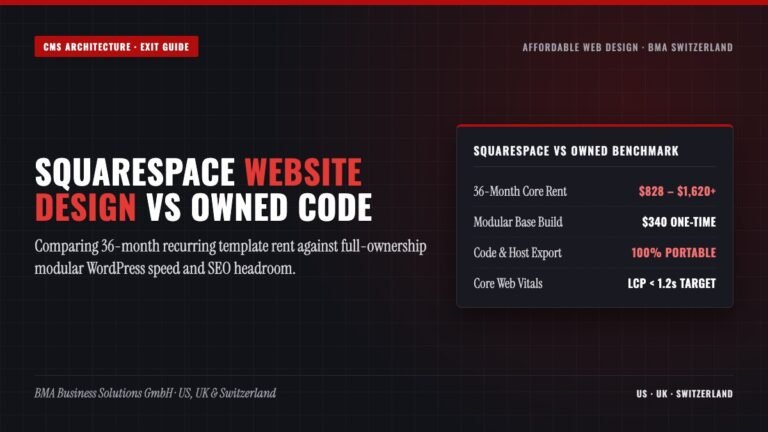
Staying on Wix Core or Business plans plus booking/email add-ons typically costs $35–$59/month ($1,260–$2,124 over 36 months) with zero asset portability. By contrast, migrating to modular WordPress at BMA Business Solutions GmbH starts at $340 (£255 | CHF 280) for the 1-page core build plus +$50 (£37 | CHF 41) per extra page, paired with standard ~$8/month hosting you control outright. If you run an online shop on Wix eCommerce, our one-time +$500 (£375 | CHF 412) WooCommerce module removes SaaS platform transaction taxes permanently.
| Expense Category | Stay on Wix Business (36 Mos) | Migrate to Modular WordPress (6 Pages) | 3-Year Owner Advantage |
|---|---|---|---|
| Initial Build / Rebuild Fee | $0 (already built) | $590 ($340 base + 5 × $50 extra pages) | One-time asset you own 100% |
| Platform / Hosting Rent (36 Mos) | $1,656 (~$46/mo average) | $288 (~$8/mo independent host) | Saves $1,368 in recurring SaaS rent |
| Core Web Vitals & Script Weight | Closed Wix JS runtime | Lean Gutenberg + server page cache | Sub-1.5s mobile LCP potential |
| UK ICO / Swiss nFADP Control | Platform cookie banner limits | Full local font + consent script control | Clean ICO & nFADP compliance |
| 36-Month Net Cash Outlay | $1,656+ (and rising renewals) | $878 total (100% portable code) | +$778 net savings + full code equity |
Pre-Cutover HTTP Verification & 30-Day Search Console Watch
Before flipping live DNS, test every legacy URL from your crawl sheet against the new staging host using an automated curl -I batch script to verify a single clean 301 Moved Permanently hop straight to a 200 OK destination—zero redirect chains and zero 404 gaps. Immediately after DNS propagates, submit your fresh Yoast XML sitemap inside Google Search Console and use the Change of Address or URL Inspection tool across your top ten revenue pages. Monitor server 404 logs daily for the first 14 days so any overlooked legacy PDF, brochure link, or external directory URL gets patched with a 301 rule within hours.
Post-Launch Core Web Vitals & Cache Warmup Checks
After DNS switches cleanly to WordPress, verify server-level page caching, Brotli/Gzip compression, and local font preloading on real 4G mobile throttles via PageSpeed Insights. Check that Google Analytics, Search Console verification, and any Meta or Google Ads conversion tags fire once per lead submission without duplicate events. Finally, keep your old Wix billing active on a lower tier for two weeks only if you still need access to historical invoice archives, then cancel cleanly once every exported archive and live form confirms delivery.
Avoid Auto-Migration Plugins That Import Wix Layout Junk
Automated migration connectors promise one-click magic yet routinely dump inline CSS classes, hardcoded pixel heights, and unindexed attachment pages directly into your WordPress database. Cleaning up malformed block HTML after a noisy automated import takes longer than building crisp native Kadence or Gutenberg blocks cleanly from scratch. Treat text and photography as portable content, while engineering every header, schema block, and 301 redirect map deliberately for long-term speed and maintainability.
For businesses operating across French, German, or Italian regions in Switzerland—such as our client portal builds localcatsitter.ch and allea.ch—our Foreign Language Module adds clean hreflang architecture for +$100 (£75 | CHF 82) setup plus +$30 (£22 | CHF 25) per translated page. Every migration includes a 100% On-Time Money-Back Guarantee and launches in 7 to 14 working days.
Escape Wix Subscriptions Without Losing a Single Ranking
Let BMA Business Solutions GmbH engineer your complete Wix-to-WordPress migration—including full URL inventory, 301 redirect parity, and lean Gutenberg speed—from $340 | £255 | CHF 280 (+$50/extra page) in 7–14 days.
Related Tri-Market Research & Cluster Guides
Website Builder vs Web Designer Reality
Price 30+ lost owner hours against fast native engineering and zero-commission ownership.
Zero-Drop Website Redesign Protocol
Protect organic equity across URL changes, heading resets, and speed rebuilds from $340.
Gutenberg vs Elementor Speed Audit
Inspect DOM depth growth, mobile main-thread blocking, and licence debt side by side.
Migrate Wix to WordPress: Frequently Asked Questions
These answers detail 301 redirect parity, email DNS safety, turnaround windows, and modular pricing for moving from Wix to self-hosted WordPress.