For over a decade, WordPress users have been conditioned to chase a green light. You install a popular SEO plugin, type your keyword into a box, achieve a “Green Score,” and assume your website is perfectly optimized for Google. In 2026, this “checklist SEO” is not merely outdated; it is a severe commercial liability. Before any of this, work through our small business SEO checklist so the foundations are sound.
Google’s machine learning algorithms—now deeply integrated with AI Overviews and the Knowledge Graph—do not care about your plugin’s arbitrary scoring system. They evaluate your website based on brutal technical realities: how instantly your code renders on a congested 4G mobile network, how mathematically precise your semantic entity mapping is, and whether your server architecture can deliver a flawless User Experience (UX) without computational friction.
When you rely solely on a plugin while running a heavy drag-and-drop page builder, you are putting a Ferrari steering wheel inside a broken tractor. The fundamental architecture is compromised.
This masterclass destroys the commodity “10 easy tips” format. We are exposing the exact, unvarnished technical engineering tactics that elite digital architects use to force WordPress to dominate the 2026 algorithmic landscape. From eradicating “Divception” to deploying advanced native Gutenberg architectures, this is your blueprint for enterprise-grade performance.
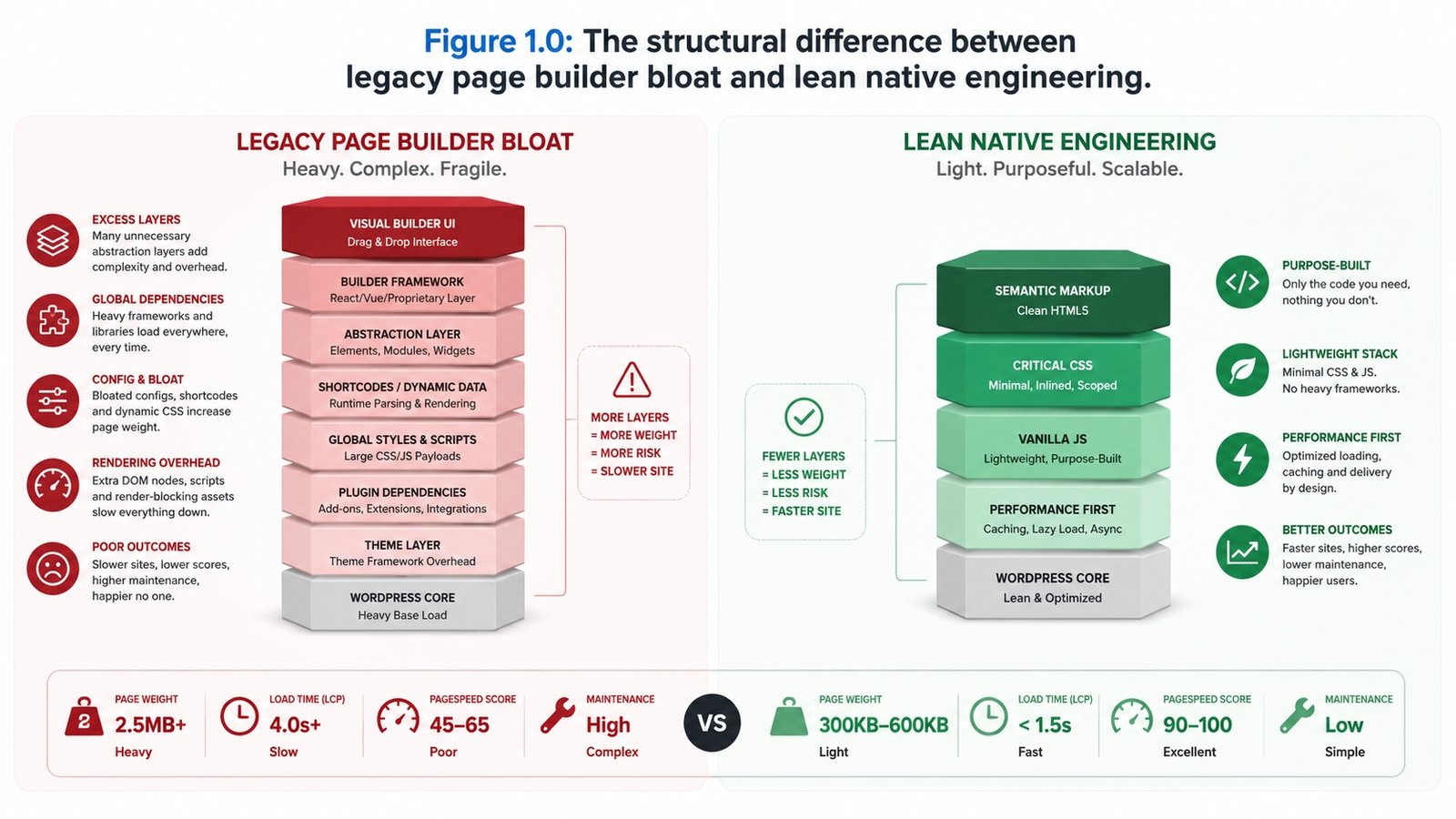
Figure 1.0: The structural difference between legacy page builder bloat and lean native engineering.
Tactic 1: The Page Builder Purge (Eradicating DOM Bloat)
The greatest threat to a WordPress website‘s ranking potential is invisible to the human eye. It hides inside the source code. To allow non-coders to visually drag and drop elements across a screen, legacy builders (like Elementor, Divi, or WPBakery) must generate thousands of lines of unnecessary, deeply nested HTML tags. This is known in the engineering world as DOM Bloat.
When a prospective customer’s mobile browser attempts to load a bloated page, the CPU spikes violently as it struggles to calculate the layout of thousands of empty <div> containers. This directly triggers an algorithmic penalty.
The 2026 Engineering Fix: Elite agencies have entirely abandoned heavy visual builders. We engineer exclusively using Native Gutenberg Block Architecture. By writing custom, lightweight blocks that compile directly into clean, semantic HTML5, we strip away up to 80% of the page’s code weight. The result is a layout that renders instantly, satisfying Google’s strict demand for lean digital real estate.
Tactic 2: Interaction to Next Paint (INP) Domination
In March 2024, Google officially replaced First Input Delay (FID) with a much stricter Core Web Vital metric: Interaction to Next Paint (INP). By 2026, INP has become the definitive UX ranking signal.
INP measures exactly how long it takes for your website to visually respond after a user interacts with it (e.g., tapping a menu button, clicking an accordion, or submitting a form). If a standard WordPress site is running 30 active plugins and a heavy theme, the browser’s “main thread” is entirely blocked executing messy JavaScript. When the user taps, the site freezes for a half-second. You fail the test, and your organic rankings plummet.
The 2026 Engineering Fix: We execute aggressive JavaScript debouncing and execution yielding. This means identifying heavy scripts (like chat widgets, tracking pixels, or complex animations) and forcing them to delay execution until after the user has actually interacted with the page. We keep the main browser thread completely empty so that when a user taps, the response is sub-50 milliseconds.
The Algorithmic Impact of DOM Architecture on INP
Comparing the mobile responsiveness delay of legacy page builders against lean, natively coded block environments.
Tactic 3: Advanced JSON-LD Entity Injection
Basic SEO plugins inject a very generic layer of schema markup. They might tell Google that your page is an “Article” or a “WebPage.” This is completely insufficient for establishing dominance in the modern Knowledge Graph.
To command true semantic authority, the algorithm requires precise, deeply nested entity mapping. It must understand exactly who you are, what geographic space you control, and how your authors are verified experts.
The 2026 Engineering Fix: We bypass basic plugin defaults and inject custom, machine-readable JSON-LD payloads directly into the WordPress header. If you are a local service, we write explicit LocalBusiness schema that maps your exact Latitude/Longitude coordinates, links directly to your official government tax registry via the sameAs property, and defines exact areaServed geographic polygons. By utilizing these affordable SEO services for small businesses, we mathematically prove your real-world existence to the search bots.
Is Your WordPress Codebase Costing You Leads?
Stop relying on plugins to fix structural flaws. Speak with a senior digital architect to request a comprehensive technical search audit and expose your hidden DOM bloat.
Tactic 4: Server-Side Object Caching and TTFB Reduction
Time to First Byte (TTFB) is the measurement of how long it takes your server to send the very first piece of data to the user’s browser after they click a link. If you are using cheap, shared WordPress hosting, your server has to physically rebuild the webpage from the MySQL database every single time someone visits. This can cause TTFB delays of over 1.5 seconds—destroying your conversion rate before the page even begins to visually load.
The 2026 Engineering Fix: A caching plugin (like WP Rocket) is good, but Server-Side Object Caching is elite. We utilize advanced server infrastructure running Redis or Memcached. This stores the fully built database queries directly in the server’s RAM. When a user requests a page, the server delivers it instantaneously from memory without ever querying the MySQL database, achieving TTFB speeds under 100 milliseconds.
Tactic 5: Native Block Architecture for Semantic HTML
Google’s crawlers are blind. They cannot “see” your beautiful design; they read tags. A fundamental problem with commodity WordPress themes is that they use generic <div> tags for everything. The crawler cannot differentiate your footer from your main content.
The 2026 Engineering Fix: By fully embracing Native Block Architecture, we enforce strict HTML5 semantic landmarks. We ensure the main content is wrapped in an <article> tag, the navigation uses a <nav> tag, and distinct topics are separated by <section> tags. This flawless hierarchy allows Google’s Natural Language Processing (NLP) models to effortlessly extract and understand your core entities.
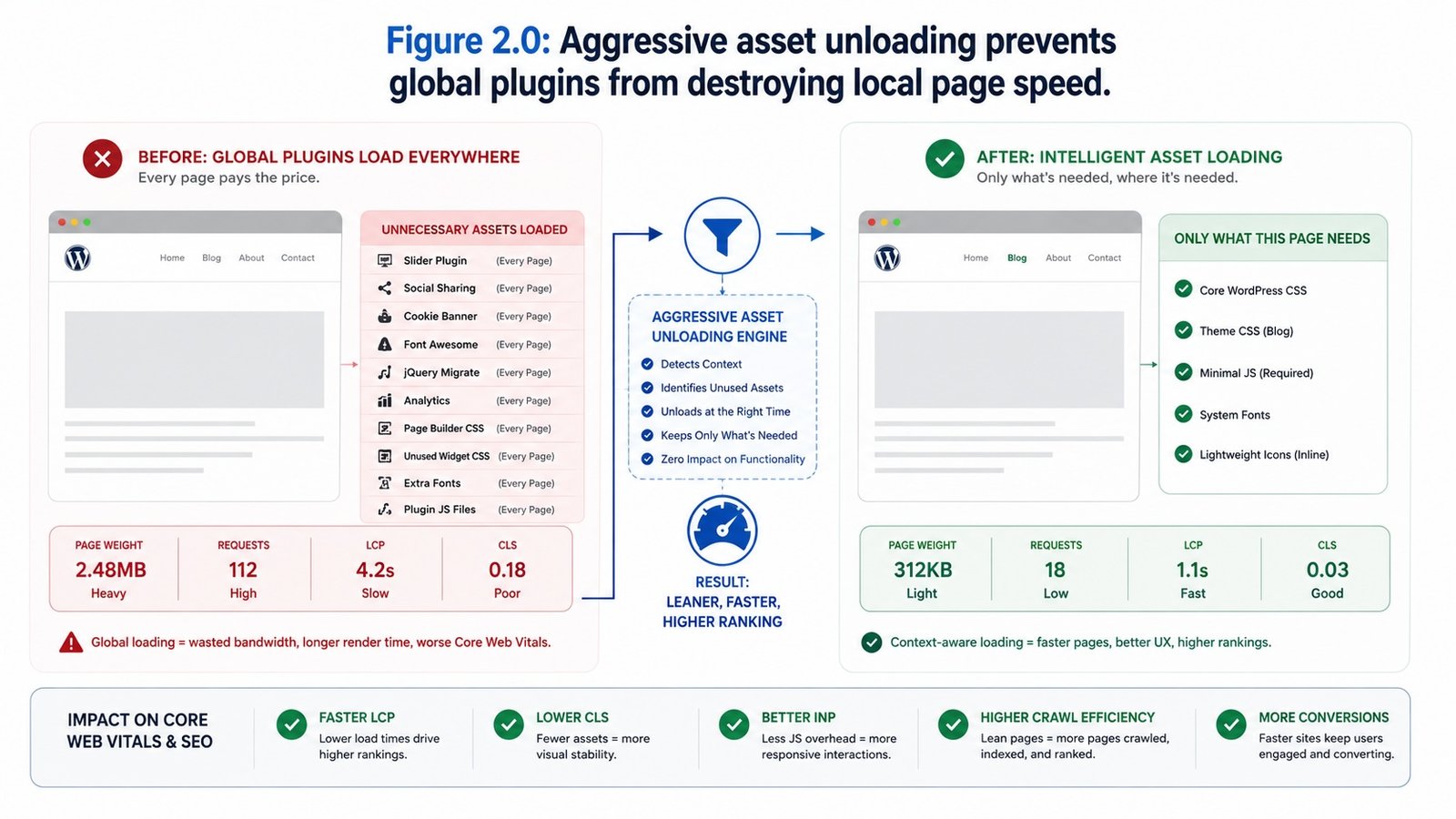
Figure 2.0: Aggressive asset unloading prevents global plugins from destroying local page speed.
Tactic 6: Database Optimization and Orphaned Meta
Over years of operation, a WordPress database becomes a chaotic landfill. Every time you install and delete a plugin, it leaves behind orphaned data in your wp_options table. Every time you revise a post, WordPress saves a copy. We frequently audit sites with 200MB of actual content dragged down by a 2GB bloated database, causing massive administrative latency and slow backend query times.
The 2026 Engineering Fix: We execute rigorous database hygiene. This involves purging thousands of useless post revisions, deleting transient transients, and surgically removing orphaned plugin tables via phpMyAdmin. A clean, optimized database processes queries exponentially faster, directly improving server response times.
Tactic 7: Image Decoding and AVIF Delivery
Uploading heavy JPEG or PNG images is an archaic practice that annihilates your Largest Contentful Paint (LCP) score. But simply installing an image compression plugin is no longer the elite standard.
The 2026 Engineering Fix: We implement next-generation AVIF format delivery via server-level rules, which produces files significantly smaller than even WebP. More importantly, we engineer the loading priority. The primary “Hero” image at the top of the page is hardcoded with fetchpriority="high" and decoding="sync" to force the browser to render it immediately. Every image below the fold is aggressively lazy-loaded using native browser protocols. This bifurcated strategy guarantees massive algorithmic speed advantages.
Tactic 8: Aggressive Asset Unloading (Script Control)
One of the most destructive behaviors of WordPress plugins (like Contact Form 7, WooCommerce, or mapping tools) is that they load their heavy JavaScript and CSS files on every single page of your website, even if the plugin is only actually used on the Contact Page. This forces mobile devices to download hundreds of kilobytes of completely useless code.
The 2026 Engineering Fix: We utilize advanced script control to aggressively “unload” assets. We write custom functions in the WordPress core that explicitly forbid these heavy scripts from loading anywhere except the specific URLs where they are required. This radical pruning instantly strips unnecessary weight from your critical landing pages.
Tactic 9: The Taxonomy Silo (Curing Cannibalization)
A massive SEO flaw in 90% of WordPress sites is category and tag bloat. When business owners create 50 different “Tags” for their blog posts, WordPress automatically generates 50 thin, low-quality archive pages. These thin pages flood the Google index, diluting your domain authority and triggering keyword cannibalization (where your own pages compete against each other in the search results).
The 2026 Engineering Fix: We architect strict Semantic Silos. We ruthlessly delete or noindex thin tag pages. We restrict categories to 4 or 5 primary “Core Entities.” We then restructure the internal linking so that authority flows perfectly up the silo from the long-tail articles directly to your high-value commercial landing pages, consolidating your ranking power flawlessly.
Tactic 10: WCAG 2.2 Accessibility as a Ranking Signal
Accessibility is no longer just a legal safeguard; it is a critical technical SEO vector. The exact same structural logic required to allow a screen reader to navigate a website for a visually impaired user is the logic Googlebot uses to parse and index your content.
The 2026 Engineering Fix: We natively engineer Web Content Accessibility Guidelines (WCAG 2.2 AA) into the WordPress DOM. This includes writing precise ARIA (Accessible Rich Internet Applications) labels for complex interactive elements, ensuring perfect keyboard focus states, and enforcing mathematical color contrast ratios. By executing this, we guarantee that high-performance small business websites are accessible to 100% of the market while delivering the pristine, structured data Google demands for premium positioning.
The Architectural Matrix: Commodity vs Custom Engineering
To visualize the massive disparity between a standard DIY setup and an enterprise-engineered architecture, review the technical matrix below.
Upgrade to a High-Performance Digital Asset
A bloated website actively suppresses your organic revenue. Consult with our digital architects to explore website design packages built explicitly for high-speed search dominance.
Executive Summary: Elevating the Standard
In the 2026 digital economy, installing a popular SEO plugin and trusting the default settings is the equivalent of digital negligence. Search engines have evolved into complex AI-driven knowledge graphs that demand pristine, frictionless architectural engineering. By stripping away heavy builders, mastering Core Web Vitals, and executing deep semantic logic, you transition your WordPress website from a fragile digital brochure into an unshakeable commercial asset.
Advanced Technical WordPress FAQ
We scour advanced developer forums and technical subreddits (like r/ProWordPress and r/SEO) to answer the complex questions that basic tutorials ignore.
Should I migrate my small business to “Headless” WordPress for better speed?
For 95% of small to medium businesses, migrating to Headless WordPress (using React/Next.js for the frontend) is a massive, unnecessary over-allocation of capital. While headless is incredibly fast, it requires advanced, ongoing developer maintenance and breaks native plugin functionality. A properly engineered, natively coded Gutenberg Block theme running on advanced object caching achieves near-identical sub-second speed scores for a fraction of the Total Cost of Ownership (TCO).
Why does my site still load slowly even though I installed a Premium Caching Plugin?
A caching plugin only hides bad architecture; it does not cure it. If your foundational DOM is bloated by a heavy page builder, or if you have excessive third-party tracking scripts (like Facebook Pixel or Hotjar) blocking the main thread, caching the HTML output won’t solve the Interaction to Next Paint (INP) delays. True speed requires structural code pruning, not just a caching bandage.
Will removing my old visual page builder destroy my current SEO rankings?
If executed poorly, yes. If engineered correctly, it will massively boost them. Removing a page builder requires a complete architectural rebuild of your pages using native blocks, followed by rigorous 301 redirect mapping and URL structure preservation. When done by a professional, the sudden, massive drop in code bloat and the improvement in INP scores will consistently trigger a positive algorithmic ranking adjustment.